
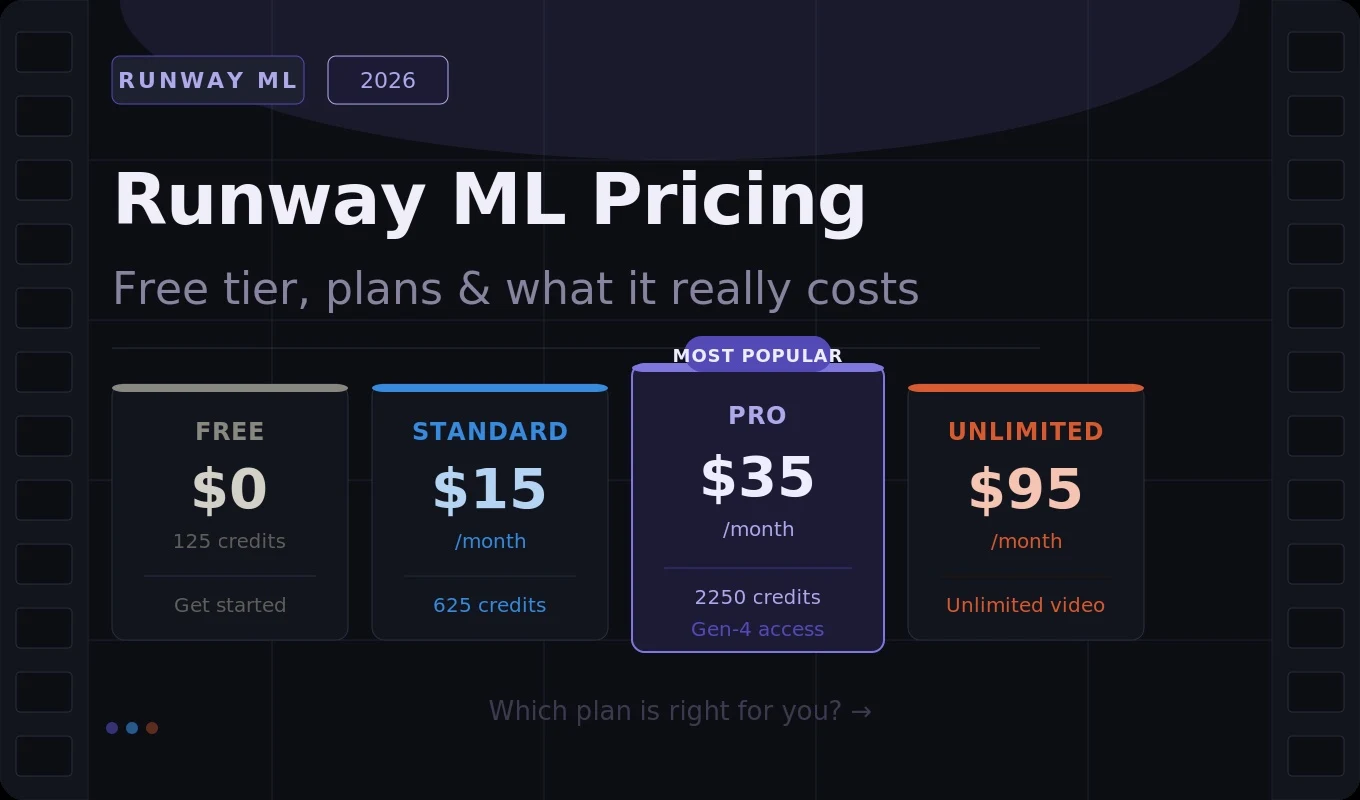
TL;DR: The Runway ML pricing free tier gives you 125 one-time credits, a visible watermark on every export, and no commercial licence — enough to test the tool but not enough to produce anything professionally. Paid plans start at $15 per month (Standard, 625 credits), $35 per month (Pro, 2,250 credits), and $95 per month (Unlimited). The Standard plan is the real entry point for small businesses. Most professional creators land on Pro. The credit system is what determines your actual monthly cost — not the headline price.

The Runway ML pricing free tier is one of the most-searched topics in AI video right now. You’ve seen the cinematic clips. You’re on the pricing page. And you’re trying to work out whether the free plan is actually usable before you commit to a monthly subscription.
The short answer: the Runway ML pricing free tier is a genuine taster but not a production tool. You get 125 one-time credits, every export has a watermark, and there’s no commercial licence. That’s enough to understand what the tool can do — it’s not enough to deliver anything to a client or publish professionally.
In this guide I’ll walk you through exactly what the Runway ML pricing free tier includes, how the paid plans compare, how far your credits actually go, and which plan makes sense for your budget and output volume.
What Is Runway ML?
Runway ML is a creative AI platform for generating videos, images, and visual effects using text prompts or existing media. It’s used by filmmakers, marketers, social media creators, and production studios worldwide. Its Gen-4 model currently produces the most cinematic AI video output available — smooth motion, consistent lighting, and realistic physics that earlier tools couldn’t match.
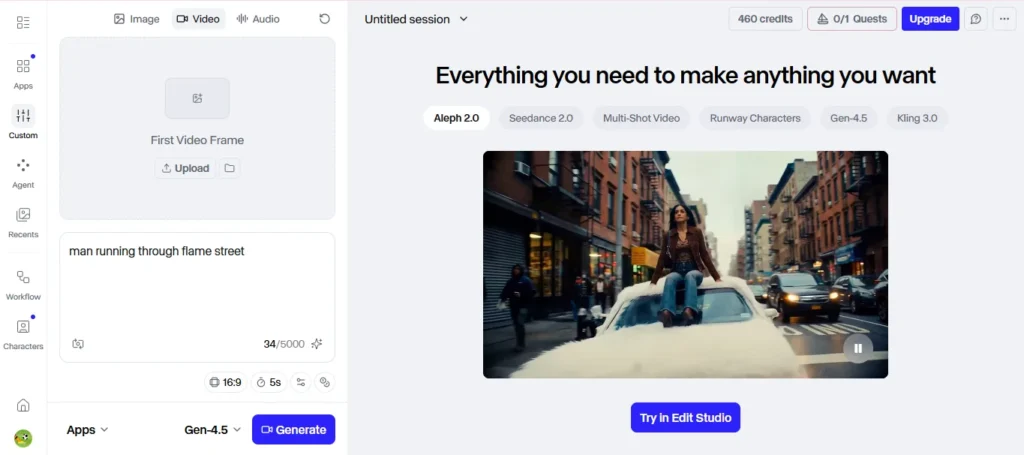
Founded in 2018 and now the industry standard for professional AI video, Runway ML is genuinely worth understanding. The question is whether the Runway ML pricing free tier gives you enough to make an informed decision before spending money — and whether the paid plans deliver value once you do.
Runway ML Pricing Free Tier: What’s Actually Included
The Runway ML pricing free tier is structured around one-time credits rather than a monthly allowance. Here’s exactly what you get:
- 125 one-time credits — not monthly, not recurring, not resettable
- Runway watermark on every video export
- No commercial licence — you cannot use free-tier exports for client or paid work
- Limited to 720p resolution
- Access to basic models only — Gen-4 and Gen-4 Turbo access is restricted
The Runway ML free plan watermark is visible on all video exports and cannot be removed without upgrading to a paid plan. For any professional or client-facing work, this makes the free tier unusable regardless of how good the output looks.
The Runway ML pricing free tier is best treated as a 15-minute orientation session — run two or three test generations, get a feel for the interface and output quality, then decide whether to upgrade. Don’t try to build anything real on a free account.
Runway ML Pricing: All Paid Plans Compared
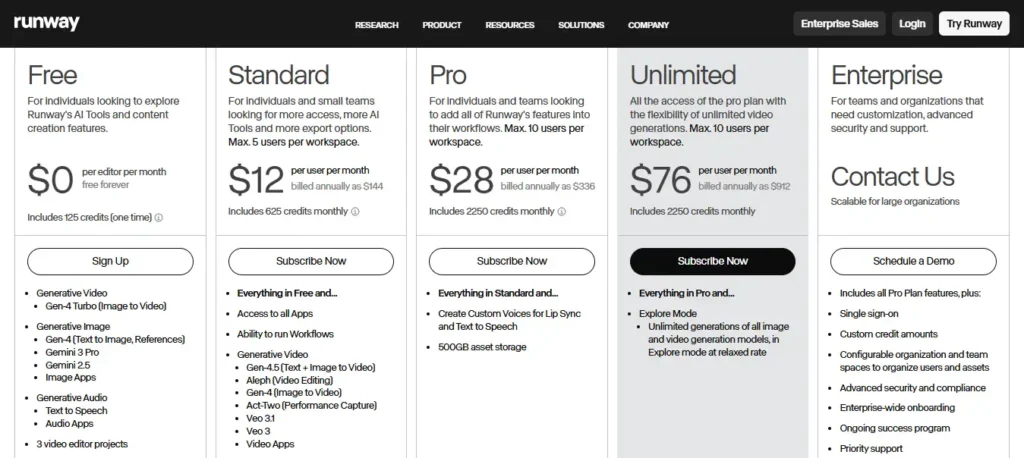
Standard — $15/month ($12/month billed annually):
- 625 monthly credits (resets each billing cycle)
- No watermark, commercial licence included
- Gen-3 Alpha access, video up to 10 seconds at 720p
- Up to 5 workspace editors
Pro — $35/month ($28/month billed annually):
- 2,250 monthly credits
- Gen-3 Alpha Turbo for faster generation
- 4K upscaling, higher priority queue
- Up to 10 workspace editors
Unlimited — $95/month ($76/month billed annually):
- 2,250 monthly credits plus Explore Mode (unlimited relaxed-rate generations)
- Built for iteration-heavy workflows
Enterprise — custom pricing:
- All Pro features plus SSO, compliance, workspace analytics, and custom credit volumes
Runway ML Pricing Free Tier vs Paid Plans: Side-by-Side
| Feature | Free | Standard ($15/mo) | Pro ($35/mo) | Unlimited ($95/mo) |
|---|---|---|---|---|
| Credits | 125 one-time | 625/month | 2,250/month | 2,250 + Explore Mode |
| Watermark | Yes | No | No | No |
| Commercial licence | No | Yes | Yes | Yes |
| Max resolution | 720p | 1080p | 4K | 4K |
| Gen-4 access | Limited | Yes | Yes | Yes |
| 4K upscaling | No | No | Yes | Yes |
| Explore Mode | No | No | No | Yes |
| Max workspace editors | 1 | 5 | 10 | 10 |
| Credits roll over | N/A | No | No | No |
| Annual billing | N/A | $12/mo | $28/mo | $76/mo |
How Far Do Runway ML Credits Actually Go?
Starting with the Runway ML pricing free tier’s 125 credits:
- Gen-4 Turbo (5 credits/second): ~25 seconds of video — roughly 5 clips of 5 seconds each
- Gen-4 (12 credits/second): ~10 seconds of video — barely 2 short clips
Standard plan (625 credits/month):
- ~125 seconds of Gen-4 Turbo video
- ~52 seconds of Gen-4 video
- Roughly 12–25 short clips per month
Pro plan (2,250 credits/month):
- ~450 seconds of Gen-4 Turbo video
- 40–90 short clips per month — enough for consistent weekly output
Critical point: credits do not roll over monthly and expire at the end of each billing period. Unused credits from a quiet month are gone — you can’t bank them for a busy month ahead.
Hidden Costs to Watch in Runway ML Pricing
Runway ML pricing starts free but the credit system hides the true cost for heavy users who hit caps mid-month. Three hidden factors that affect your real monthly spend:
Model choice. Gen-4 Turbo costs 5 credits per second. Gen-4 costs 12 credits per second. Choosing Gen-4 instead of Gen-4 Turbo burns through credits 2.4x faster. Most beginners default to the higher-quality model without realising the credit cost until they’ve exhausted their monthly allowance.
Team editor caps. Runway caps workspace editors at 5 on Standard and 10 on Pro, with extra editors billed at $15 per month each. Small teams that need more editors than the plan allows will see costs escalate quickly.
Peak hour slowdowns. Periodic stability issues during peak hours (12 PM–6 PM UTC) mean render failures and slow generation times can affect time-sensitive workflows. If you’re working to a client deadline, build in buffer time.
Runway ML Pricing Free Tier vs Paid: Which Plan Should You Choose?
Use this framework to decide when to upgrade from the Runway ML pricing free tier:
Stay on the free tier if: you want to test Runway ML before spending anything. Use your 125 credits on Gen-4 Turbo (5 credits/second) to get the most test generations. Once they’re gone, decide whether to upgrade based on what you’ve seen.
Upgrade to Standard ($15/month) if: you’re a solo creator or small business producing occasional AI video — social media clips, B-roll, concept visualisations. The 625 monthly credits cover most light use cases at a price lower than most streaming subscriptions.
Upgrade to Pro ($35/month) if: you’re producing video consistently — multiple clips per week for clients, marketing campaigns, or social channels. The 2,250 credits and 4K upscaling make this the plan most professional creators settle on.
Upgrade to Unlimited ($95/month) if: iteration is core to your workflow and you generate dozens of variants before selecting the final cut. Explore Mode delivers unlimited relaxed-rate generations that the lower Runway ML pricing tiers can’t match.
- Testing: Runway ML pricing free tier — 125 one-time credits, watermark on all exports
- Light use (1–2 clips/week): Standard $15/month
- Regular use (3–5 clips/week): Pro $35/month
- Heavy iteration: Unlimited $95/month
Conclusion
The Runway ML pricing free tier is a genuine starting point — 125 credits is enough to run half a dozen test generations and understand what the tool can produce. But it’s not a production tier. The watermark, the missing commercial licence, and the one-time credit structure make it unsuitable for anything client-facing or commercially published.
Once you’re ready to move beyond the Runway ML pricing free tier, the Standard plan at $15 per month is one of the most accessible entry points to professional AI video available. The Standard plan at $12 per month billed annually is less than most streaming subscriptions, and the skills you build will be valuable for years.
Start with the Runway ML pricing free tier today — use your 125 credits on Gen-4 Turbo to get the most test clips from your free allowance. Once they’re used, upgrade to Standard and start building AI video into your content workflow.
Frequently Asked Questions
What does the Runway ML pricing free tier include?
The Runway ML pricing free tier gives you 125 one-time credits (not monthly), a visible watermark on all video exports, no commercial licence, 720p resolution limit, and access to basic models only. It is designed for testing and experimentation rather than production use. Once your 125 credits are used they do not reset.
How much does Runway ML cost after the free tier?
After the Runway ML pricing free tier, paid plans start at $15 per month for Standard (625 monthly credits), $35 per month for Pro (2,250 monthly credits), and $95 per month for Unlimited (2,250 credits plus Explore Mode for unlimited relaxed-rate generations). Annual billing reduces these to $12, $28, and $76 per month respectively.
Does the Runway ML free tier have a watermark?
Yes. The Runway ML pricing free tier adds a visible watermark to all video exports. The watermark cannot be removed without upgrading to a paid plan. The free tier also has no commercial licence, meaning you cannot legally use free-tier exports for client work, paid projects, or commercial publishing.
How many videos can you make with the Runway ML free tier?
The Runway ML pricing free tier gives you 125 one-time credits. Using Gen-4 Turbo at 5 credits per second, you can generate approximately 25 seconds of video — roughly 5 clips of 5 seconds each. Using Gen-4 at 12 credits per second, you get approximately 10 seconds of video. Credits do not reset and cannot be topped up on the free plan.
Is Runway ML worth upgrading from the free tier for small businesses?
Yes. For small businesses producing marketing video, social media content, or client-facing assets, the Standard plan at $15 per month removes all free tier limitations — watermark gone, commercial licence included, 625 monthly credits, and 1080p resolution. The Pro plan at $35 per month is the better fit once you are producing video content consistently each week.